
Follow the steps below to safely delete a character from your account:
Step 1 – Log into the game
Open the game and log in using the account that contains the character you want to delete.
Step 2 – Go to the Character Selection screen
Once you reach the character selection screen, locate the character you wish to delete.
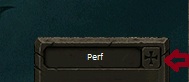
Click the “+” icon next to the character’s name, as shown in the image below.
Step 3 – Enter the deletion code
When prompted, enter the following character deletion code:
000000-0000001
⚠️ Important Notice
Character deletion is permanent and irreversible. Once the character is deleted, it cannot be recovered. Please make sure you have selected the correct character before confirming.


